
Our current timeline is 30-90 days.

Bulk Match Submission Process
The Bulk Match Submission Process complements the Matching Tool in The MLC Portal, which is used by thousands of Members to search for unmatched usage of their registered works and propose individual matches. With the Bulk Match Submission Process, Members can submit an unlimited number of proposed matches between sound recordings and their registered works, making it easier than ever to address large volumes of unmatched recordings.
Guidelines
These guidelines specify the required format and content for CSV files to be submitted, containing information about the proposed links between ISRC and MLC Song Codes. Proper adherence to these specifications will ensure seamless processing of your data.
File Format
- File Type: CSV (Comma-Separated Values)
- File Encoding: UTF-8
- Delimiter: Comma (,)
Column Definitions
| Column Name | Description | Format | Example |
| ISRC | The International Standard Recording Code assigned to a recording. | Alphanumeric, 12 characters | TCAEW2013100 |
| MLC Song Code | The MLC Song Code assigned to the work. | Alphanumeric | CC5LN2 |
Formatting Rules
- Header Row:
- The CSV must include a header row with the column names: ISRC and MLC Song Code.
- Example of a valid header row: ISRC, MLC Song Code
- ISRC Column:
- Required column.
- Must contain exactly 12 alphanumeric characters.
- Ensure no extra spaces, punctuation, or special characters.
- The ISRC must follow the ISO 3901 standard.
- MLC Song Code Column:
- Alphanumeric characters.
- No special characters, spaces, or leading zeros unless explicitly required.
- Empty Rows:
- Do not include blank rows or columns in the file.
- Duplicates:
- Ensure no duplicate entries for a particular ISRC.
- Missing ISRC:
- Ensure there are not rows with a missing ISRC.
- Retracting a previously submitted suggestion:
- If you want to retract a previously submitted suggestion, submit a row with the ISRC filled in and an empty MLC Song Code. If you submit rows with an empty MLC Song Code, we will assume you do not have a suggestion for the submitted ISRC.
Sample CSV
Here is an example of a properly formatted CSV file:
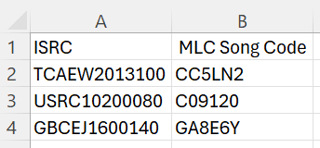
Submission Guidelines
- File Naming Convention:
- Please name the file in the following format: MemberName_BulkMatchSuggestions_YYYYMMDD.csv
- Example: AcmeMusic_ BulkMatchSuggestions_20241206.csv
- Delivery Method: Submit the file via email to bulk.matching@themlc.com
Validation Checklist
Before submitting the file, please verify the following:
- The file is saved in CSV format with UTF-8 encoding.
- All ISRC entries are exactly 12 characters long and follow the standard format.
- The MLC Song Code entries are correctly formatted and match an existing work.
- There are no duplicate or blank rows, or rows with a missing ISRC.